M4B Audiobook Builder for Mac & Windows

Your folder of MP3s becomes
a beautiful M4B audiobook in seconds.

Drag in a folder, adjust your chapters, hit Convert. m4Bookmaker handles the rest — chapters, cover art, metadata, and even repairs broken audio files automatically.

  1. Drop a folder of audio files
  2. Set title, author & chapters
  3. Click Convert — done

macOS 13+ · Windows 10+ · open source on GitHub · direct purchase supports development

Linux GUI  — coming soon
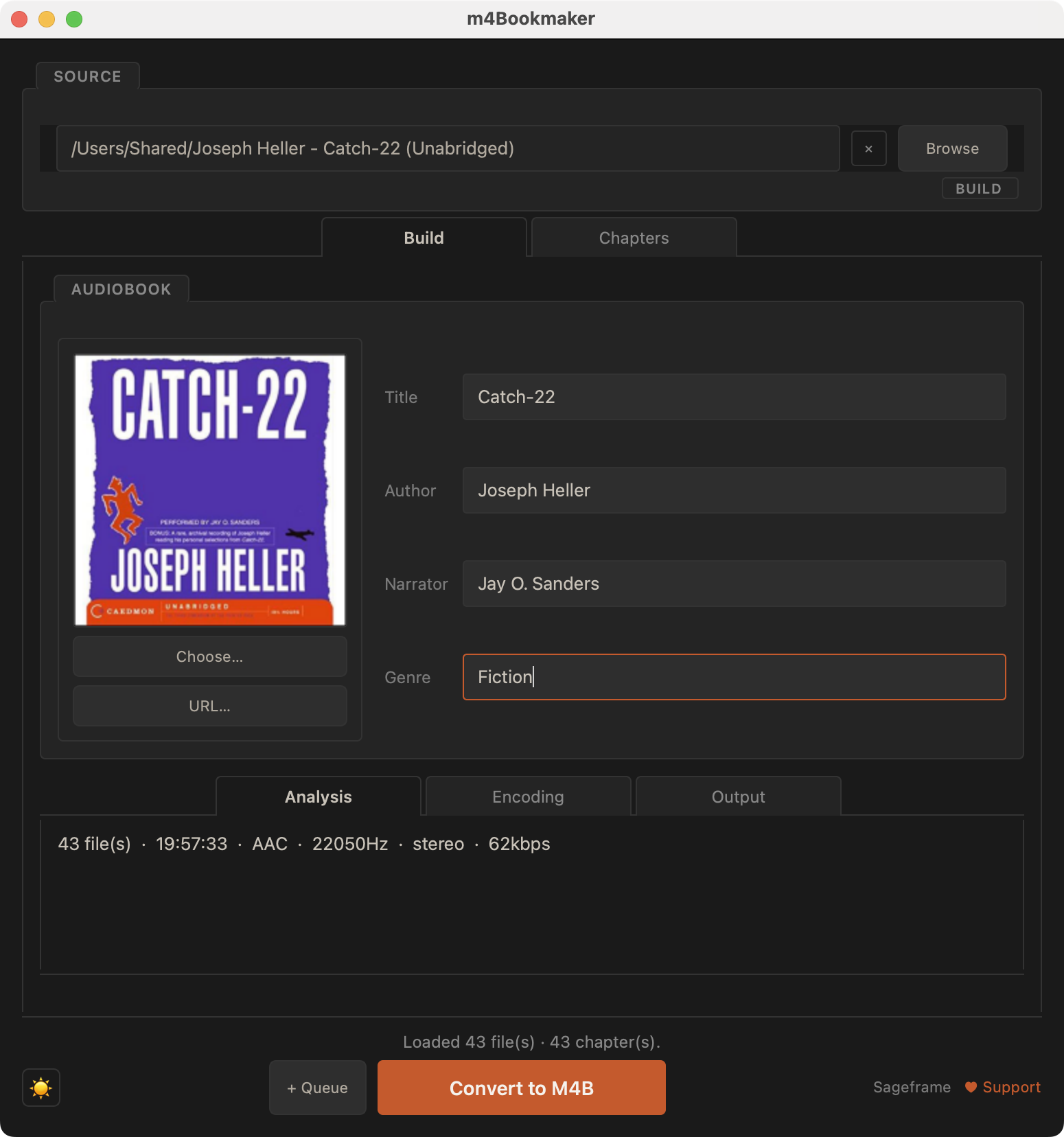
m4Bookmaker build tab — MP3 files loaded, ready to convert to M4B m4Bookmaker chapter editor — set chapter start times for M4B audiobook
Build Chapters
Free & open source on GitHub
ffmpeg powered · no cloud
Repairs broken audio automatically
Built-in audio preview player
Batch queue for collections
What makes it different

Designed for how audiobooks are actually built.

Most audiobook tools expect perfect input. m4Bookmaker is built around the reality of audiobook downloads — messy files, inconsistent formats, and titles that need work. It automatically detects and repairs corrupted audio before encoding, matches output settings to your source (bitrate, sample rate, channels), and gives you full chapter creation and inline editing with a built-in audio player — all without touching your originals.

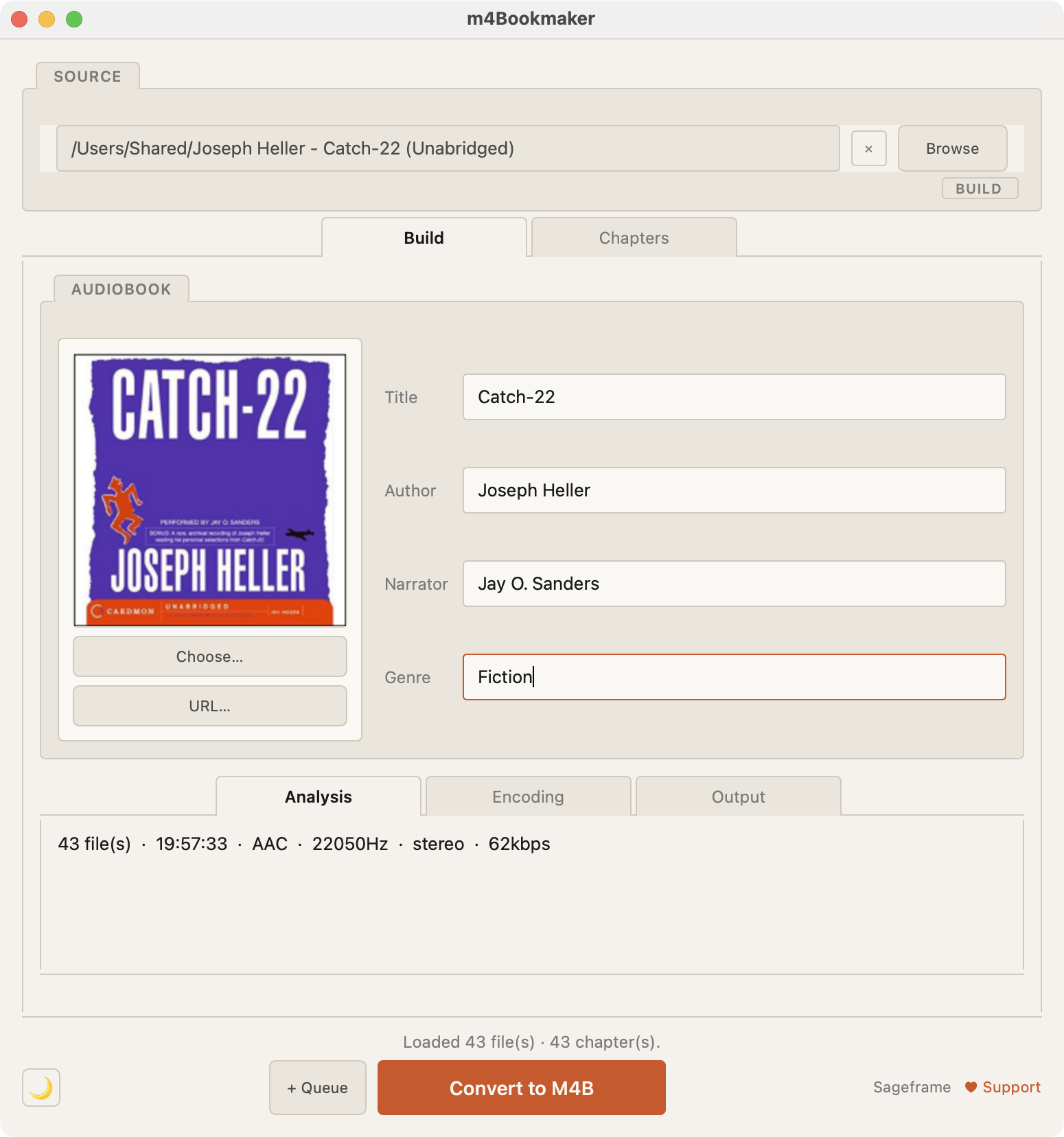
Build mode — join MP3 files into a single M4B audiobook Build mode Join a folder of files into a single .m4b
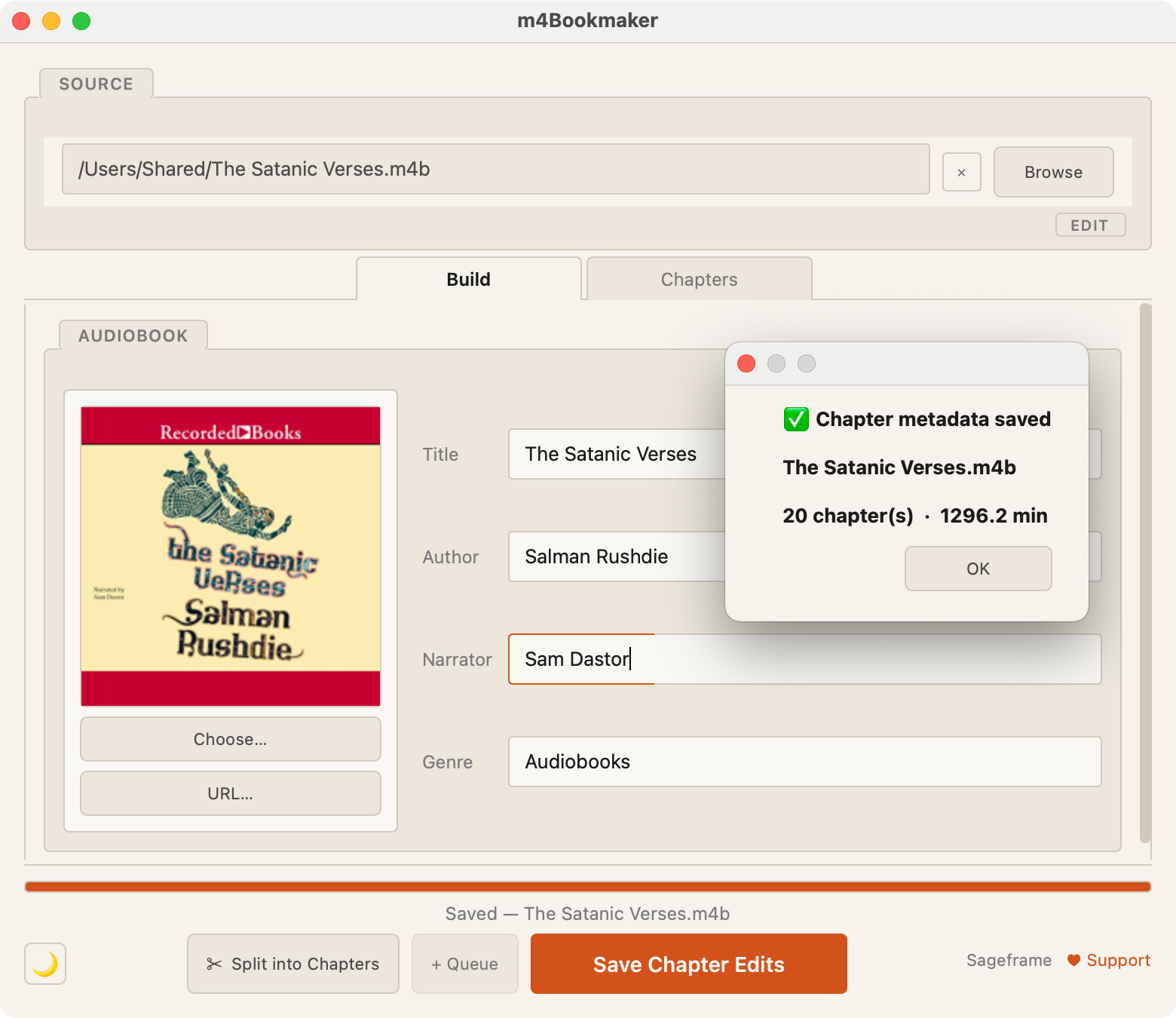
Edit mode — rechapter or re-cover an existing M4B audiobook Edit mode Rechapter, merge, reorder, or remove — zero re-encoding
Split mode — export M4B chapters as separate audio files Split mode Export each chapter as a separate audio file

Join a folder of files into a single clean audiobook

Drop any folder of audio files — MP3, M4A, AAC, FLAC, WAV, and more. File names become chapter titles automatically, track number prefixes are stripped, and everything is sorted and joined in order.

Set the title, author, narrator, and cover art. m4Bookmaker writes proper iTunes-compatible metadata so the audiobook shows up correctly in Books, Overcast, Audiobookshelf, and every major player.

  • Automatic chapter names from file names
  • Auto-selects the largest image as cover
  • Bitrate, sample rate, and mono/stereo matched to source
  • Mixed formats in the same folder — no problem
m4Bookmaker light mode — folder of MP3s ready to build as M4B audiobook
m4Bookmaker dark mode — folder of MP3s ready to build as M4B audiobook
Light Dark

A real chapter editor with a built-in audio player

Click any chapter row to seek directly to that moment in the audio. Edit titles inline, reorder with ↑↓, and set a chapter's start time from the current playback position — all without leaving the same view.

  • Inline title editing — just click and type
  • ⏮ / ⏭ to step through chapters
  • Shift-select a range and Merge into one chapter
  • Set chapter start from playback position
  • Reorder and remove chapters
  • Full playback: play, pause, scrub
  • Bulk-edit titles — number as "Chapter 1 … N", find/replace with regex, add prefixes, clear. One right-click.
Built-in audio player widget
Chapter editor with inline editing and audio player

Edit an existing .m4b without re-encoding

Open any .m4b file and rechapter it in Edit mode. Rename, reorder, merge, or remove chapter markers and save the changes back in-place — the audio stream is never touched. Every operation is non-destructive.

The built-in Split tool exports each chapter as a separate audio file, stream-copied and numbered automatically.

  • Merge chapters — collapse markers, keep all audio
  • Reorder and remove chapters with no quality loss
  • Adjust chapter start times from playback position
  • Split into separate chapter files in one click
  • Metadata (title, author, cover) all editable
m4Bookmaker Edit mode — rechaptering an existing .m4b file
Batch queue

Stage your whole collection. Process overnight.

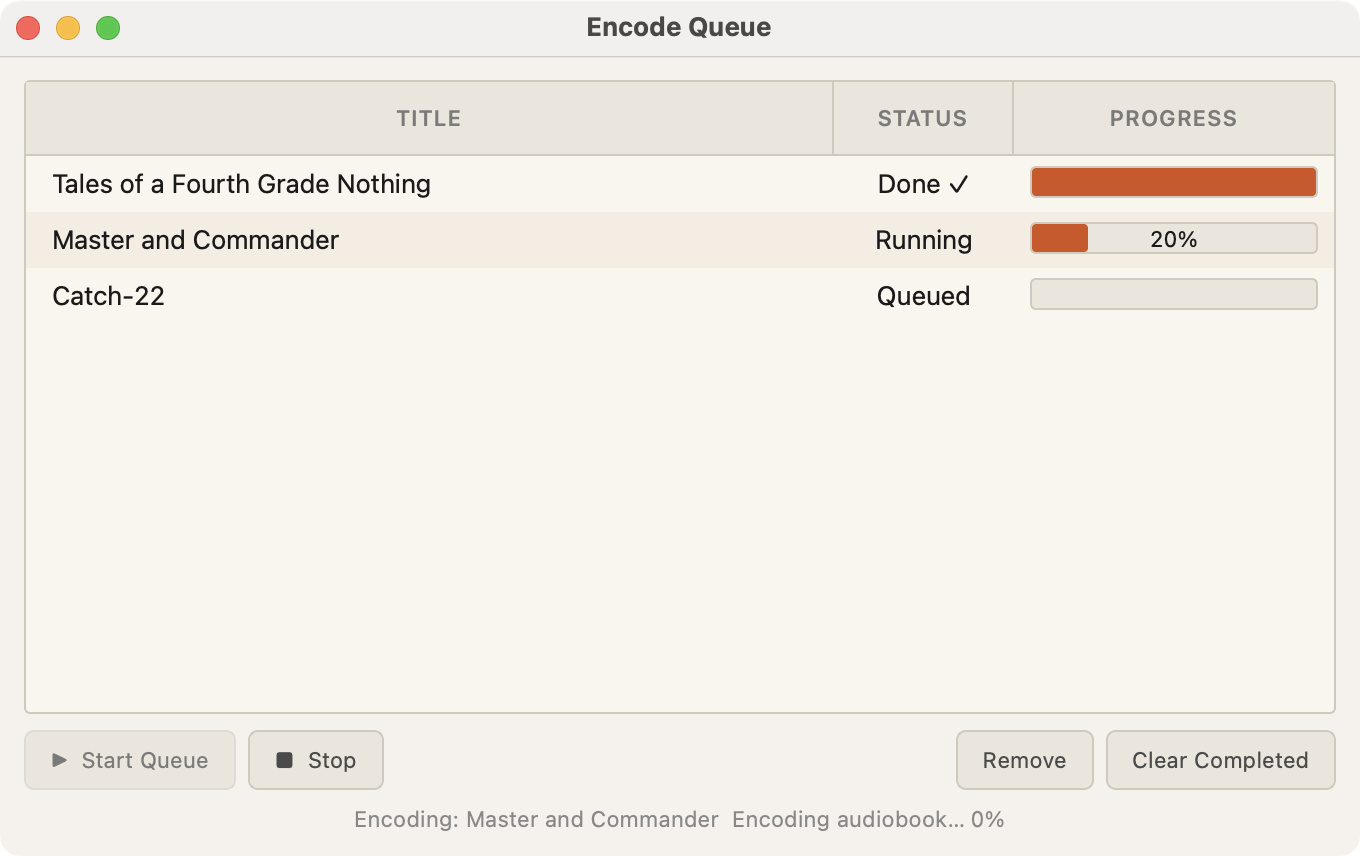
Add as many audiobook jobs as you want to the queue. Each job captures the full current state — folder, metadata, chapters, cover, encoding settings, output path.

Start the queue and walk away. Jobs run sequentially. Failed jobs show an error and continue to the next — one bad source file won't derail the whole night's work.

  • Add, remove, and reorder jobs
  • Per-job progress tracking
  • Clear completed jobs at any time
  • Stop and resume the queue
  • Failed jobs logged, queue continues
m4Bookmaker batch queue — multiple audiobook jobs with status and progress
Full feature list

Everything you need. Nothing you don't.

✂️

Split into Chapters

Open any existing .m4b and export each chapter as a separate audio file — stream-copied, no re-encoding. Outputs are named and numbered automatically.

Edit mode
🔄

Rechaptering (Edit Mode)

Load an existing .m4b, rename chapters, merge or remove markers, reorder them, adjust timestamps, and save — all without touching the audio stream.

Non-destructive
📋

Batch Queue

Stage multiple audiobook builds and process them overnight. Add to Queue captures the full current state — folder, metadata, chapters, cover, encoding settings, and output path.

HandBrake-style
🖼

Cover Art

The largest image in your source directory is automatically selected as the cover. Override with any image file or paste in a URL. Embedded correctly for all major players.

⚠️

Close-While-Running Protection

If you try to close the app while an encode is running, you'll get a warning. No accidental job cancellations.

🚀

Multiple Windows

Press ⌘N to open a new independent window. Each window runs its own encode in the background with no shared state.

💻

Full CLI Support

Every feature is available on the command line. Batch scripts, Docker pipelines, and automation workflows work cleanly.

Scriptable
📁

Flexible Output Options

Choose your output directory, control the file naming, and set the output format. Defaults are sane — overrides are easy.

🔓

Free & Open Source

Full source code on GitHub under the GPL-3.0 license. Use it, fork it, contribute to it.

GPL-3.0 License
Under the hood

Handles the mess so you don't have to.

Audio files from the internet are often damaged, inconsistent, or poorly formatted. m4Bookmaker detects and fixes all of it before the first frame is encoded.

Command line

For power users and automation.

The CLI is a first-class citizen. Full flag and man page support. Use it in scripts, Docker, or CI pipelines.

# Build an audiobook from a folder
$ m4bmaker ./Dune \
    --title    "Dune" \
    --author   "Frank Herbert" \
    --narrator "Scott Brick" \
    --cover    cover.jpg

# Batch-build an entire audiobook library
$ for dir in ~/Audiobooks/*/; do
    m4bmaker "$dir" --output ~/Output/
  done

Open source · Built on ffmpeg · Runs locally · No cloud, no account

Two ways to get it

Free forever. Or support the project.

m4Bookmaker is free and open source. The direct download is identical — the $9.99 supports continued development.

Direct download

m4Bookmaker for Mac & Windows

$9.99

25% off with code MJ68JVMO7M — $7.49 through 15 October 2026


One-time purchase. No subscription. ffmpeg bundled — no setup required. Supports continued development.

  • All features included
  • ffmpeg bundled — zero setup
  • One-time purchase, no subscription
  • Self-contained — no Python, no ffmpeg needed
  • Supports ongoing development

Requires macOS 13 (Ventura) or later — Intel or Apple Silicon — or Windows 10 or later (64-bit). On older systems, use the free command-line version instead.

Buy & Download →
Open source

GitHub

Free

Full source code. GPL-3.0 license. Build it yourself, contribute to it, or just use it.

  • Full CLI implementation included
  • GPL-3.0 license — copyleft protected
  • Community contributions welcome
  • Works on Mac, Windows, and Linux
  • pip install m4bmaker — one command
View on GitHub →